Table of contentsClick link to navigate to the desired location
This content has been automatically translated from Ukrainian.
Gosu is a library for developing 2D games and graphical applications in the Ruby programming language (as well as C++). It simplifies game creation by providing a set of convenient and efficient tools for working with graphics, sound, text, and input management.
Gosu Features
- Gosu supports loading and displaying images in PNG, JPEG, and other formats. Animation is also supported through sprite sheets.
- The library allows displaying text using system fonts or loaded font files.
- Gosu supports playing sounds and music in WAV and MP3 formats, making it easy to add sound effects and musical accompaniment to the game.
- The library provides convenient handling of input from the keyboard and mouse, simplifying the control of characters and other game elements.
- Gosu allows creating smooth animations using timers and frame cycles.
- Thanks to its open-source nature and support for extensions, Gosu easily integrates with other libraries and allows adding new functionalities.
In the threads related to this post, I will gradually add small notes on how to work with Gosu. I have also attached a video with a demo packed in a Ruby gem.
Let's install the Gosu demo:
gem install gosu-examples
Now let's run the demo:
gosu-examples
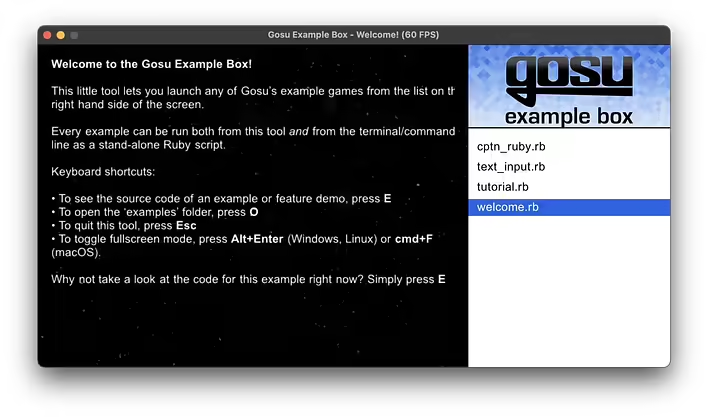
Welcome to the Gosu Example Box!

This little tool lets you launch any of Gosu’s example games from the list on the right hand side of the screen.

Every example can be run both from this tool and from the terminal/command line as a stand-alone Ruby script.

Keyboard shortcuts:

• To see the source code of an example or feature demo, press E.
• To open the ‘examples’ folder, press O.
• To quit this tool, press Esc.
• To toggle fullscreen mode, press Alt+Enter (Windows, Linux) or cmd+F (macOS).

Why not take a look at the code for this example right now? Simply press E.
If you press E right away, the part corresponding to this first screen will open in your code editor:
require "gosu"

WIDTH, HEIGHT = 640, 480

class Welcome < (Example rescue Gosu::Window)
  PADDING = 20

  def initialize
    super WIDTH, HEIGHT

    self.caption = "Welcome!"

    text =
      "<b>Welcome to the Gosu Example Box!</b>

      This little tool lets you launch any of Gosu’s example games from the list on the right hand side of the screen.

      Every example can be run both from this tool <i>and</i> from the terminal/command line as a stand-alone Ruby script.

      Keyboard shortcuts:

      • To see the source code of an example or feature demo, press <b>E</b>.
      • To open the ‘examples’ folder, press <b>O</b>.
      • To quit this tool, press <b>Esc</b>.
      • To toggle fullscreen mode, press <b>Alt+Enter</b> (Windows, Linux) or <b>cmd+F</b> (macOS).

      Why not take a look at the code for this example right now? Simply press <b>E</b>."

    # Remove all leading spaces so the text is left-aligned
    text.gsub! /^ +/, ""

    @text = Gosu::Image.from_markup text, 20, width: WIDTH - 2 * PADDING

    @background = Gosu::Image.new "media/space.png"
  end

  def draw
    draw_rotating_star_backgrounds

    @text.draw PADDING, PADDING, 0
  end

  def draw_rotating_star_backgrounds
    # Disregard the math in this method, it doesn't look as good as I thought it
    # would. =(

    angle = Gosu.milliseconds / 50.0
    scale = (Gosu.milliseconds % 1000) / 1000.0

    [1, 0].each do |extra_scale|
      @background.draw_rot WIDTH * 0.5, HEIGHT * 0.75, 0, angle, 0.5, 0.5,
        scale + extra_scale, scale + extra_scale
    end
  end
end

Welcome.new.show if __FILE__ == $0
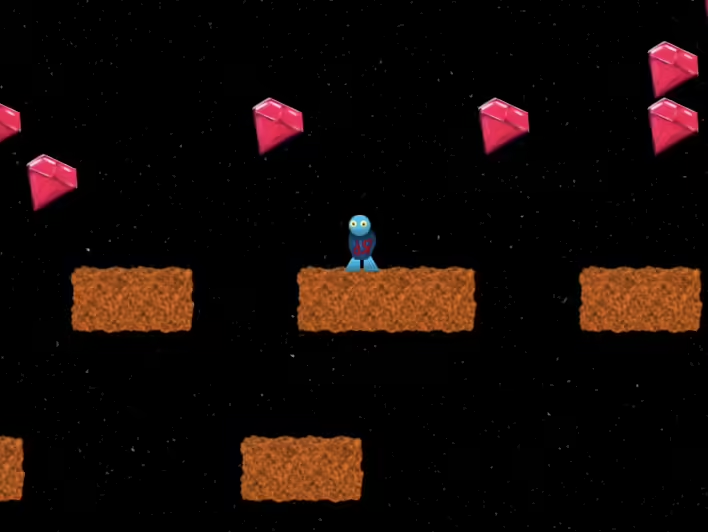
And by choosing cptn_ruby.rb, you can play a simple platformer (I added a gameplay video to this post) ^_^
In the next post, I will discuss the process of writing/creating a game a bit more.

![[Fix] extconf.rb failed during the installation of the Ruby library Gosu](https://cdn.tseivo.com/0ecmyhdaifoxn1pv8ei5ij54scgj)